Dokploy: Deploy Your Applications Without Overcomplicating Your Infrastructure
- devops
- docker
- deployment

Building an application is one thing. Making it accessible on the Internet is another.
You usually need a server, install Docker, configure a reverse proxy, manage domains, environment variables, SSL certificates, logs, databases… And as the project grows, all these small tasks become increasingly difficult to maintain.
This is exactly where Dokploy comes in.
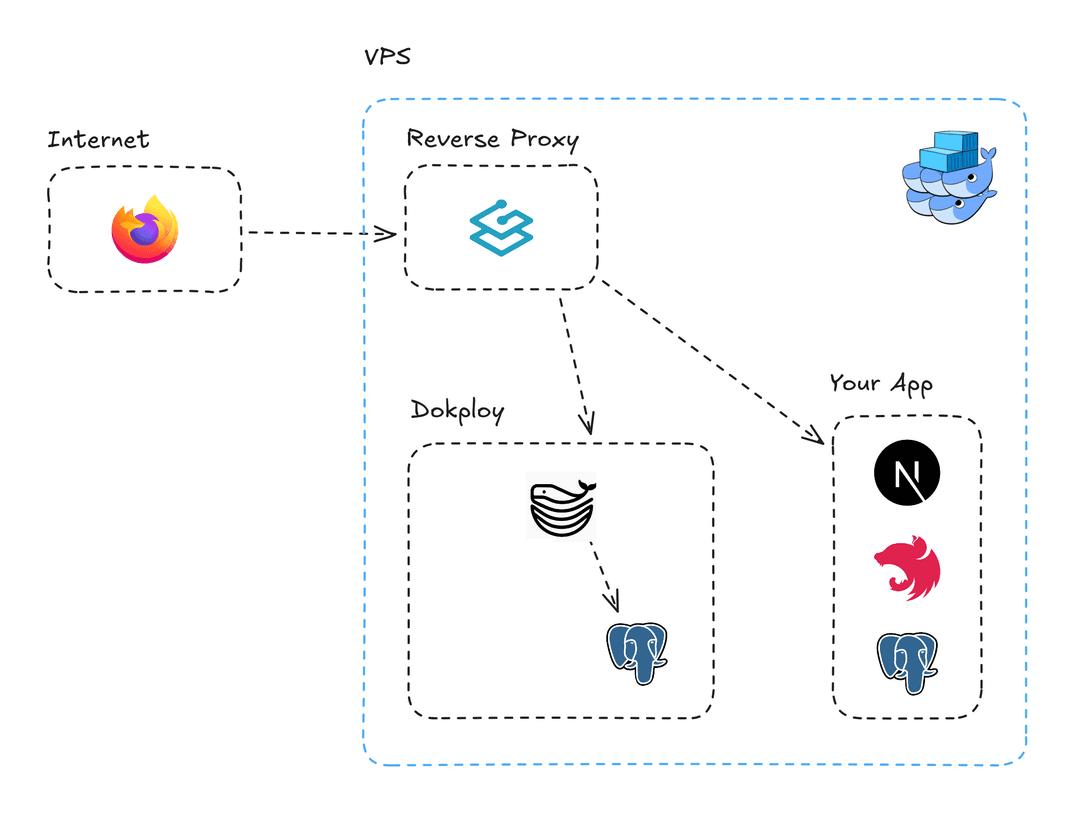 Architecture Diagram
A self-hosted alternative
Dokploy is an open-source, self-hostable platform that lets you deploy and manage applications directly on your own servers.
The idea is fairly simple: instead of manually configuring every part of your infrastructure, you get an interface that centralizes most of these operations.
Dokploy relies mainly on Docker to run applications and on Traefik to handle routing.
You can connect a Git repository, define how the application should be built, set environment variables, and launch the deployment.
From code to server
Let’s take a Django application stored on GitHub.
The flow can be summarized like this:
GitHub
   ↓
Dokploy
   ↓
Application build
   ↓
Docker container
   ↓
Traefik
   ↓
myapp.com
Dokploy supports several Git providers, including GitHub, GitLab, Bitbucket, and Gitea. It can also trigger automatic deployments through webhooks.
This brings the deployment process closer to the workflow developers already use: I push my code, the application is redeployed.
What if the application is more complex?
Dokploy is not limited to deploying a single isolated application.
It also supports Docker Compose, which makes it possible to manage multiple services within the same project: an application, a database, a cache service, and so on.
Databases can also be deployed and administered from Dokploy, including PostgreSQL, MySQL, MongoDB, MariaDB, and Redis.
You also get features such as real-time logs, resource monitoring, volumes, and backups.
What Dokploy actually changes
The point of Dokploy is not to make Docker or infrastructure concepts disappear.
On the contrary, Docker remains at the core of the system.
The difference is that Dokploy adds a layer of abstraction that makes this infrastructure easier to work with.
Instead of systematically going through the terminal to configure every component, you get a centralized interface to manage applications, domains, deployments, logs, and resources.
And most importantly, unlike a fully managed platform from a provider, the server remains under your control.
A new way of looking at deployment
Dokploy does not replace infrastructure knowledge. It mainly makes it more accessible and reduces the amount of repetitive configuration.
For a developer who owns a VPS and wants to deploy several projects without building the entire infrastructure from scratch, this approach is particularly interesting.
Deployment then becomes less a succession of commands and configuration files, and more a natural part of the development cycle.
Develop, push, deploy.